

Why Proxies Are Required
FunBypass requires a proxy for every task. The proxy is used to initialize the session from an IP address that matches your target use case. Using the right proxy is critical for stable completion rates.Proxy Format
Proxies must follow this format:Supported Protocols
Validation Rules
The API validates your proxy before processing:- Protocol must be
http,socks4, orsocks5 - Port must be between 1 and 65535
- Authentication (username:password) is required
- The proxy must be reachable within 3 seconds
Best Practices
Use residential proxies
Use residential proxies
Residential proxies have the highest success rates because they appear as real user connections. Datacenter proxies may be flagged by FunCaptcha.
Match proxy location to target
Match proxy location to target
Use proxies from the same region as your target users. The API automatically detects the proxy’s geolocation and sets the correct timezone and language.
Rotate proxies
Rotate proxies
Avoid using the same proxy for too many consecutive requests. Rotate across a pool of proxies to reduce detection risk.
Test proxy connectivity
Test proxy connectivity
Before sending tasks, verify your proxy is working and has acceptable latency. High-latency proxies increase processing time.
Recommended Proxies
We recommend the provider below for FunBypass tasks.Legion Proxy
Supports UDP and HTTP/3 with sticky SOCKS5 sessions — modern transport and stable connections that hold up across FunCaptcha tasks.
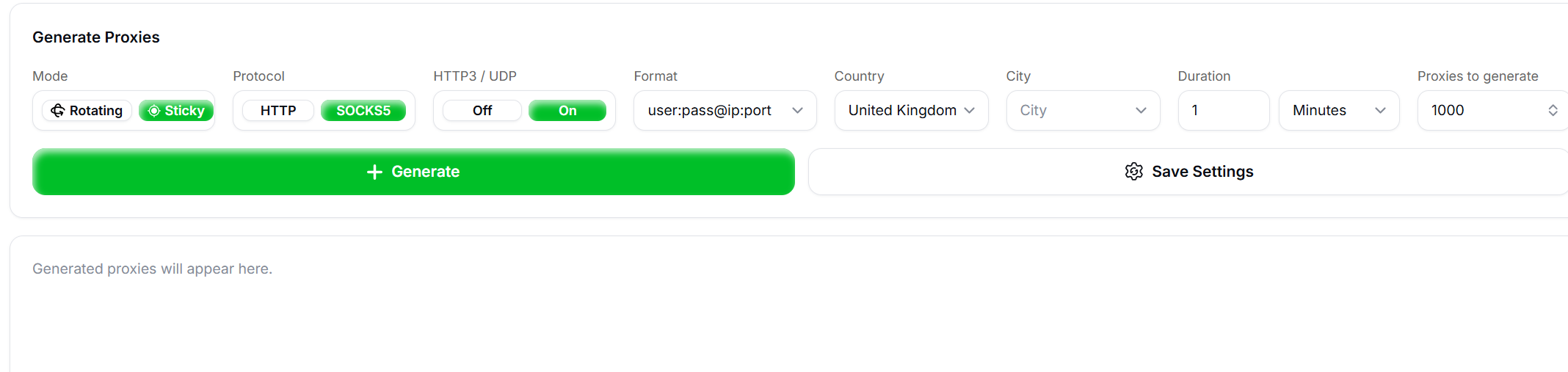
Recommended Legion Proxy settings
socks5://user:pass@ip:port string.
Proxy Errors
Invalid or unreachable proxies return anERROR_INVALID_PROXY_* or ERROR_PROXY_CONNECTION code. See Error Codes for the full list.
IP Geolocation
When a task is processed, the API fetches geolocation data from the proxy’s IP address to determine:- Timezone offset — Used in fingerprint generation
- Language — Sets the
Accept-Languageheader - Region — Matches browser locale settings