> ## Documentation Index
> Fetch the complete documentation index at: https://docs.funbypass.com/llms.txt
> Use this file to discover all available pages before exploring further.
# Proxy Configuration
> How to configure proxies for interaction tasks.
## Why Proxies Are Required
FunBypass requires a proxy for every task. The proxy is used to initialize the session from an IP address that matches your target use case. Using the right proxy is critical for stable completion rates.
## Proxy Format
Proxies must follow this format:
```
protocol://username:password@ip:port
```
### Supported Protocols
| Protocol | Example |
| -------- | --------------------------------- |
| HTTP | `http://user:pass@1.2.3.4:8080` |
| SOCKS4 | `socks4://user:pass@1.2.3.4:1080` |
| SOCKS5 | `socks5://user:pass@1.2.3.4:1080` |
## Validation Rules
The API validates your proxy before processing:
* **Protocol** must be `http`, `socks4`, or `socks5`
* **Port** must be between 1 and 65535
* **Authentication** (username:password) is required
* The proxy must be reachable within 3 seconds
Invalid proxies will return an error immediately. Dead or slow proxies will cause `ERROR_PROXY_CONNECTION` after the connection timeout.
## Best Practices
Residential proxies have the highest success rates because they appear as real user connections. Datacenter proxies may be flagged by FunCaptcha.
Use proxies from the same region as your target users. The API automatically detects the proxy's geolocation and sets the correct timezone and language.
Avoid using the same proxy for too many consecutive requests. Rotate across a pool of proxies to reduce detection risk.
Before sending tasks, verify your proxy is working and has acceptable latency. High-latency proxies increase processing time.
## Recommended Proxies
We recommend the provider below for FunBypass tasks.
Supports UDP and HTTP/3 with sticky SOCKS5 sessions — modern transport and stable connections that hold up across FunCaptcha tasks.
**Recommended configuration:**
| Setting | Value |
| ---------------- | ---------------------------------------- |
| Proxy type | Sticky SOCKS5, UDP enabled |
| Session rotation | 1–30 minutes, depending on your use case |
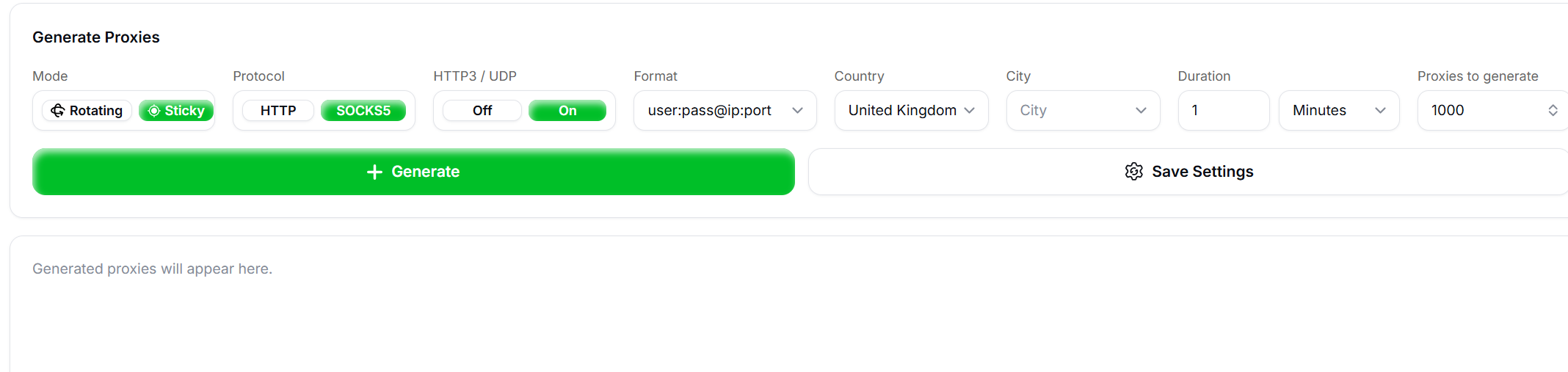 Pass it to your task as a standard `socks5://user:pass@ip:port` string.
## Proxy Errors
Invalid or unreachable proxies return an `ERROR_INVALID_PROXY_*` or `ERROR_PROXY_CONNECTION` code. See [Error Codes](/api-reference/error-codes#proxy-errors) for the full list.
## IP Geolocation
When a task is processed, the API fetches geolocation data from the proxy's IP address to determine:
* **Timezone offset** — Used in fingerprint generation
* **Language** — Sets the `Accept-Language` header
* **Region** — Matches browser locale settings
This happens automatically — you don't need to configure it manually.
Pass it to your task as a standard `socks5://user:pass@ip:port` string.
## Proxy Errors
Invalid or unreachable proxies return an `ERROR_INVALID_PROXY_*` or `ERROR_PROXY_CONNECTION` code. See [Error Codes](/api-reference/error-codes#proxy-errors) for the full list.
## IP Geolocation
When a task is processed, the API fetches geolocation data from the proxy's IP address to determine:
* **Timezone offset** — Used in fingerprint generation
* **Language** — Sets the `Accept-Language` header
* **Region** — Matches browser locale settings
This happens automatically — you don't need to configure it manually.